
Browser extension
Hover Bookmarks Bar
Your bookmarks bar, hidden until you rest the mouse at the top of the page.
Keep your screen clean without giving up your bookmarks bar. Rest the mouse at the top edge of any page and the bar slides down over it. Move away and it tucks itself back up.
I built it for Dia, which doesn't offer an auto-hiding bookmarks bar. It works in Chrome, Edge, Brave and Vivaldi too.
Why you'll like it
More room for the page
The bar takes no space until you want it, so every page gets the full height of the window.
Nothing to sync
It shows your browser's own bookmarks bar. Changes made in either place show up in the other, in every open tab.
Feels native
It matches each page's colour and ignores page zoom, so it looks like part of the browser.
Private and light
No data collection and no network requests. Nothing is added to a page until you first hover.
A tour
What it does
01 · Reveal on hover
There when you reach for it
Rest the mouse at the very top of a page for a moment and the bar slides down over the page. Move away and it hides again. It doesn't hide while a menu, dialog or drag is open.
It never appears in fullscreen, so videos and presentations stay clean.
02 · Folders
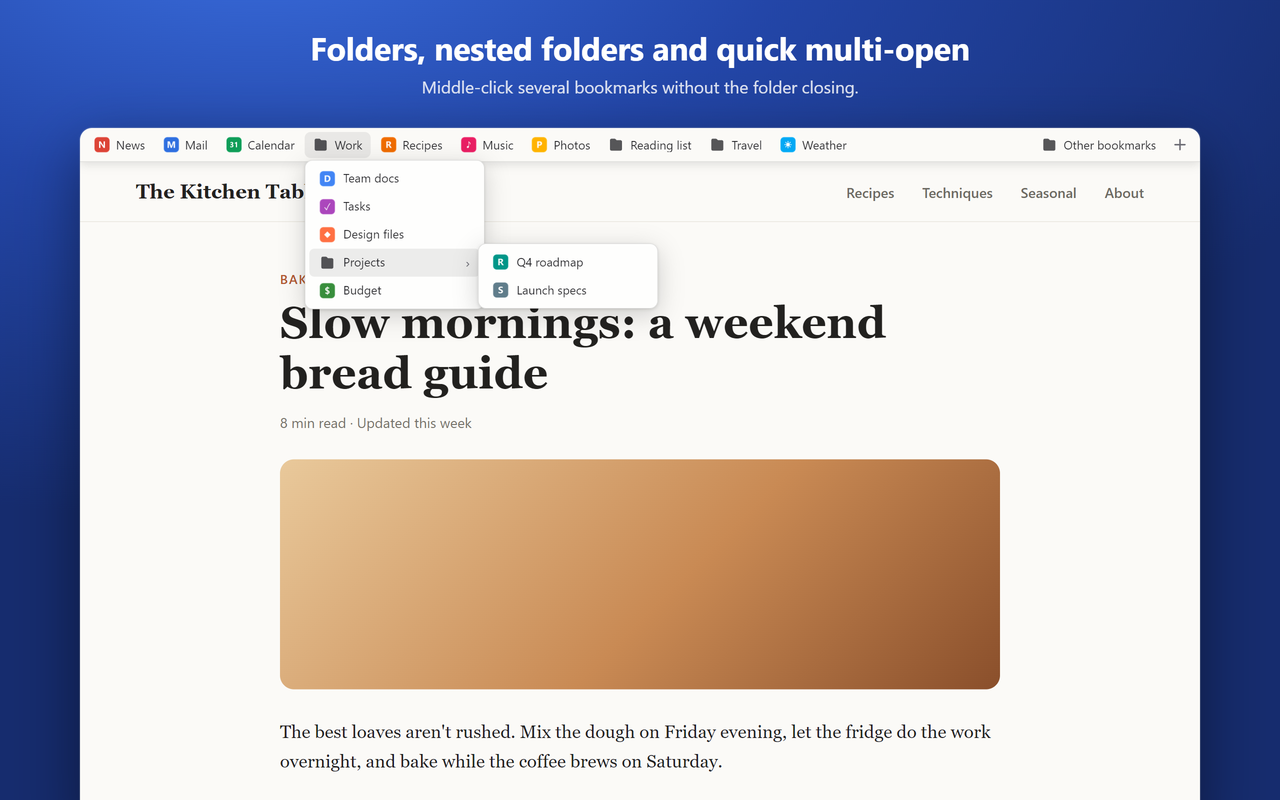
Folders, nested folders and quick multi-open
Click a folder to open it, hover other folders to switch, and nested folders open on hover. A » menu catches bookmarks that don't fit across the width.
Middle-click or Ctrl+click opens a bookmark in a background tab and keeps the folder open, so you can open several in a row.
03 · Colour matching
Matches the page you're on
The bar takes on the colour of the top edge of the page, light or dark. Dia tints its toolbar from those same pixels, so your toolbar keeps its colour while the bar is showing.
Page zoom doesn't affect it either. The bar stays the same size as the rest of the browser's interface.
04 · Editing
Edit right from the bar
Bookmark the current page with + (or edit it with ★). Right-click to open in a new tab or window, edit, rename, delete, open all or create a folder.
Drag to reorder, drop into folders, or drag a link from the page up to the top edge to bookmark it.
Getting started
Install the extension
Download it from GitHub, open your browser's extensions page, turn on Developer mode and choose Load unpacked.
Reload tabs that were already open
The extension only runs in pages loaded after it was installed, so refresh any tabs you had open.
Hide your browser's own bookmarks bar
Turn it off in your browser's settings (Ctrl+Shift+B in most Chromium browsers) so the hover bar is the only one on screen.
Rest the mouse at the top of a page
The bar slides down over the page. Move away and it tucks itself back up.
Full setup instructions are in the README on GitHub.
Troubleshooting
The bar doesn't appear.
Reload the tab first: pages opened before the extension was installed or updated don't have it yet. Browsers also block every extension on their own pages, so the bar can't appear on the new tab page, settings pages, the Chrome Web Store, or some built-in PDF views.
The bar or my browser's toolbar turns a different color.
The bar copies the color at the top edge of the page so browsers like Dia keep their toolbar tint. That needs the extension's site access. If you loaded the extension from a folder and later updated it, remove it and add it again so the browser grants the new permission.
Vivaldi shows the wrong bookmarks.
Vivaldi doesn't tell extensions which folder its bookmark bar uses. Open the extension's Options (Extensions → Hover Bookmarks Bar → Details → Extension options) and pick that folder. Open tabs switch right away.
Where are my bookmarks stored?
In your browser, exactly where they already were. The bar shows your browser's own bookmarks bar, so anything you change in one place shows up in the other. There's nothing to sync or export.
Will it slow pages down?
No. Nothing is added to a page until you first hover at the top, the script starts after the page has finished loading, and your bookmarks are only read when the bar opens.
Privacy
The extension doesn't collect, store or send any data. Your bookmarks stay in your browser, and the snapshot it uses to match a page's color is processed in memory and thrown away.
Read the privacy policyStill stuck?
Open an issue on GitHub with your browser and what you're seeing, and I'll take a look. For anything else, send me a message.
Why I built it
I switched to Dia and missed Zen's auto-hiding bookmarks toolbar. I didn't want to give up the screen space or my bookmarks bar, so I built the in-between.
The hard part was making it disappear in every sense. It doesn't slow down page loads, it matches the page colour so the browser's own tint doesn't flicker, and it uses the bookmarks you already have.
Try Hover Bookmarks Bar
It's free and open source. Download it, read the code, or open an issue if something doesn't work.


