
Desktop app · Email client
Post
A calm, minimal Gmail client for Windows that keeps your mail on your machine.
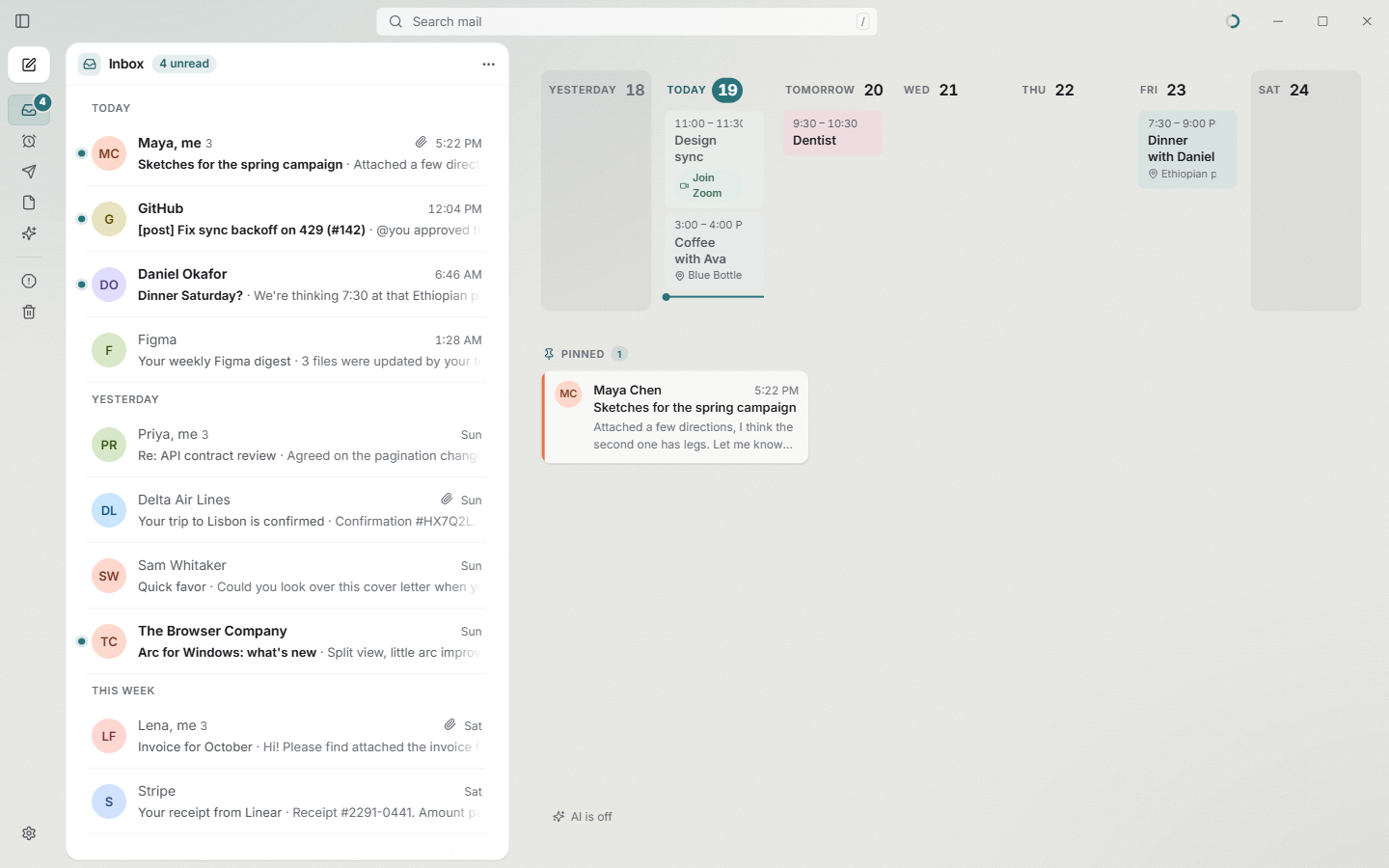
Post is a desktop Gmail client for Windows 11 built to feel quiet. A collapsible sidebar, a threaded two-line list and a reading pane. Light and dark follow Windows, and a few hand-tuned moods set the tone.
Under the hood it stores your mail locally in SQLite with full-text search. Results appear instantly while Gmail's own search runs alongside, and the two are merged.
Why you'll like it
Fast, everywhere
Headers and text for every message live in a local, compressed index, so search and scrolling never wait on the network.
Quiet by default
No labels, categories or stars competing for attention. Just the mail, a calendar strip and the thread you're reading.
Keyboard first
Gmail's shortcuts work as you'd expect (j/k, r, a, f, #, /, c, g i…), plus a Ctrl+K command palette for everything else.
AI on your terms
Bring your own Anthropic key. The assistant asks before it acts, and a monthly spending cap keeps costs predictable.
A tour
What it does
01 · Inbox
Your day, at a glance
The home view puts your inbox beside a strip of the week's calendar, with meeting links one click away. Pinned threads stay in view until you mark them done.
Post lives in the system tray, starts with Windows, shows a notification for each new email with a Mark as read button, and keeps an unread count on the taskbar icon.
02 · Reading
Threads that read like conversations
Conversations collapse to one line per message until you open them. Attachments show as previews and only download when you open them.
Emails render in a sandboxed, script-free frame. Your newest 2,000 messages keep their full HTML, and older ones are fetched when you open them.
03 · Dark mode
Dark mode that includes the email
Most clients darken their own interface and leave HTML emails glaring white. In dark mode, Post recolours each email to match the rest of the app.
04 · Command palette
Everything is one shortcut away
Ctrl+K opens a palette of every action with its shortcut alongside, so you learn the keys as you go. Compose, reply, forward, archive, snooze or ask the AI without touching the mouse.
05 · Writing
Compose your way
Rich text with a signature, contact autocomplete, undo send, schedule send and drafts that sync to Gmail. Compose opens inline, as a floating panel, full screen or in its own window.
Pasted images go into the message itself, and Post can be your default mailto: handler.
06 · AI assistant
Ask your inbox anything
Ask a question ("When does my lease end?") or tell it what to do ("Archive the shipping notifications"). Post searches your mail locally, answers with sources and shows exactly what it's about to change before it does it.
It also drafts replies, summarizes long threads and sorts mail into AI sections you describe in plain words.
07 · AI settings
Costs you can see
The API key is stored in Windows Credential Manager. AI turns on or off with one switch, and a monthly cap pauses AI features once you hit it. Most requests cost about a cent.
08 · Moods
Make it feel like yours
Pick an accent and a mood (Classic, Paper, Slate, Forest, Sand, Dusk, Rose, Mono or Midnight). Each sets the colours, tints and headings, and works in light and dark. Auto follows the time of day.
Getting started
Build or install Post
Clone the repo and run npm run tauri build to produce the Windows installer, then run it.
Create a Google OAuth client
A one-time, roughly ten-minute setup. Post walks you through it on first launch.
Sign in and let it index
Post backfills newest-first, so recent mail is ready right away while older mail fills in.
Optionally add an Anthropic key
Turn on the assistant, drafted replies, summaries and AI sections from Settings → AI.
Full setup instructions are in the README on GitHub.
Why I built it
I wanted an email client that felt like a calm room rather than a control panel, and I wanted search that never made me wait.
Post was also an exercise in designing for trust with AI. Nothing happens to your mail without a confirmation, every answer cites its sources, and spending is visible and capped.
Try Post
It's free and open source. Download it, read the code, or open an issue if something doesn't work.


