
Desktop app · AI meeting notes
Loam
Turns your meetings into notes, plus a memory that grows with every one.
Starting a new job means a firehose of meetings, acronyms, people and internal tools. Loam records every one of those meetings through a capture card, transcribes it locally, and asks Claude to write a structured note. Nothing gets installed on the computer being recorded.
Every note feeds a knowledge base that keeps growing: a glossary that flags terms nobody explained, a directory of who owns what, a map of the systems people mention, and a list of open questions that later meetings close out.
Why you'll like it
Miss nothing
Every meeting becomes a note with a summary, decisions, action items and open questions, so you can stay in the conversation instead of typing.
Ramp up faster
The glossary, people and systems pages build themselves. After a month you have the onboarding guide nobody wrote.
Ask instead of search
Ask a question in plain English and get an answer drawn from your own meetings, with links back to the moment it was said.
Private by design
Transcription, screenshots, search and the knowledge base all stay on your PC. Only the note-writing call goes to Claude, and Loam shows the price first.
A tour
What it does
01 · Today
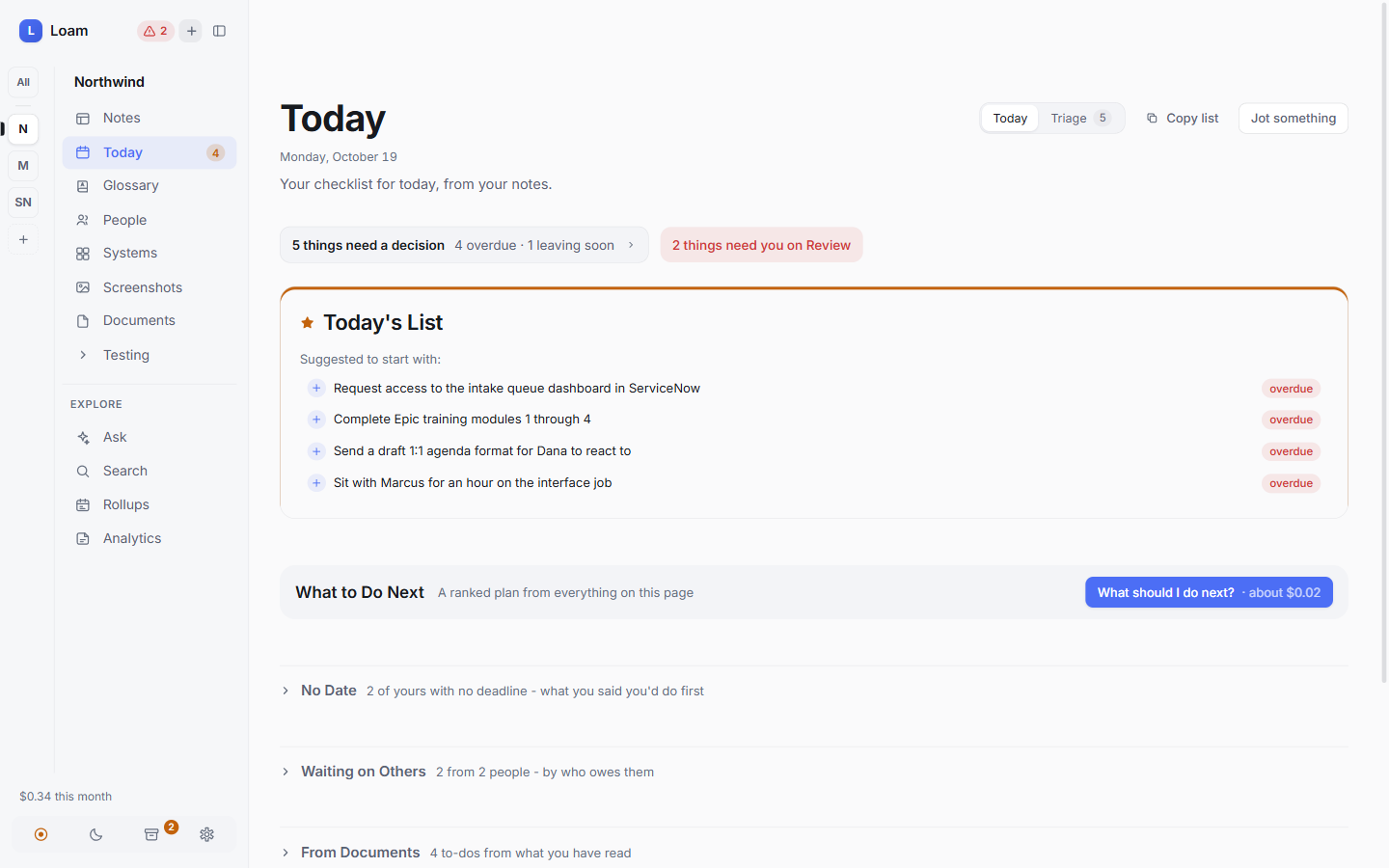
Start the day knowing what you owe
Today gathers every action item from every meeting into one checklist and sorts the overdue ones to the top. Deadlines stay in the words people used, like "end of week", but Loam turns them into dates.
One click asks Claude for a ranked plan of what to do next. A Triage view handles anything still waiting on a decision.
02 · Notes
Every recording, written up
Each recording becomes a markdown note with a summary, key points, decisions, action items, procedures, a glossary and the people and systems that came up. Sections only appear when they have something in them.
Filter by tag, type, person or date, or flip to a calendar to see your week of meetings at a glance.
03 · Calendar
See where the hours went
The calendar view places every note on the day it was recorded, colour-coded by meeting type. It's an easy way to find "that walkthrough from last Tuesday".
04 · Session note
A note you can trust
Every action item links to the exact timestamp it came from. A speaker timeline shows who talked when, and the full transcript sits beside the note so you can check any line against the recording.
Loam can also rename recordings after their notes, so a folder of videos reads as a list of meetings rather than timestamps.
05 · Glossary
Every acronym, explained
Each acronym and piece of internal shorthand gets its own entry, with every session it came up in. Terms nobody explained are flagged "Ask someone", which shows you what to ask in your next one-on-one.
Merging is plain, predictable code rather than an AI call, so a bad transcription can never quietly rewrite a definition you already trust.
06 · People & systems
Who owns what, and what everything is for
People pages track each person's role, what they know about and every meeting they appeared in. Systems pages do the same for internal tools: what each one is for and where it came up.
Before a meeting, a prep brief pulls together who someone is, what's still outstanding with them and what to ask.
07 · Decisions & open questions
Close the loops
Decisions from every session collect in one place, each linked to the meeting where it was made. Open questions stay on a list until a later meeting answers them, and Loam ticks them off on its own.
08 · Rollups
The week, in one page
Each night, daily and weekly rollups gather the threads that ran across several meetings, what got decided and what's still open. They're the summary you'd write if you had the time.
09 · Analytics
Know what it costs
Loam tracks hours recorded, notes written and exactly what the AI calls cost, down to the cent per note. A monthly budget cap stops spending before it surprises you.
10 · Setup
Set up in about five minutes
A guided setup covers your name and voice, the API key, where recordings land, your first Area and what this PC can run. It explains every paid step before you agree to it.
Loam then runs as its own app window, starts with Windows and keeps watching for recordings even when the window is closed.
Getting started
Clone and install
Create a Python environment and install Loam's requirements, then build the web app with npm.
Add your Claude API key
Paste it into .env. Budget about $0.20 per hour of recording.
Point your recorder at a folder
OBS, a capture card, a phone or an SD card all work. The two-track audio setup is what puts you in your own transcripts.
Run notes serve
Record as usual. When a recording finishes, Loam processes it and shows a Windows notification when the note is ready.
Full setup instructions are in the README on GitHub.
Why I built it
I built Loam while starting a new role, buried in back-to-back meetings full of acronyms, systems and names I didn't know yet. I wanted to stay present in the room and still keep everything.
The design goal was trust. Failures are visible instead of silent. The vault is plain markdown you can open in Obsidian. And every action item links back to the moment in the recording it came from.
Try Loam
It's free and open source. Download it, read the code, or open an issue if something doesn't work.


